Supernote → Obsidian
E-ink handwriting to digital notes
I write longhand on a Supernote, an e-ink tablet. I built a pipeline that turns those pages into notes in my Obsidian vault, where FfLAPa takes over.
The notebook syncs to a directory. A Python helper walks it and hashes each page by its raw strokes so the same page resolves to the same note wherever it runs. It renders the pages to images and hands them to a transcription step that titles them. Another helper creates sets of pages. Handwriting goes in; digital fleeting notes come out.
Here’s how it works:
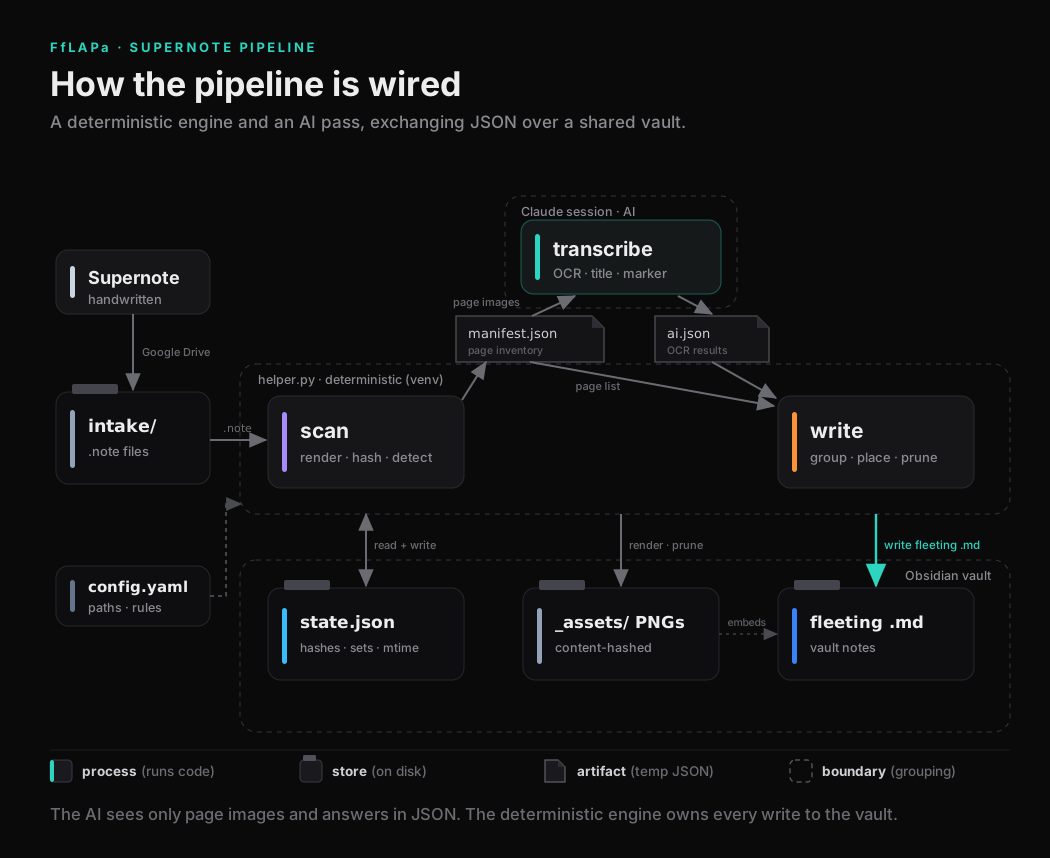
- Write on the Supernote. Google Drive syncs the
.notefiles to a folder on a computer, which is the intake. scanwalks the intake. For each page it renders an image, hashes the page from its raw strokes, and compares that hash against the last run to find what is new or changed. It writesmanifest.json: every page, with the ones that still need OCR flagged.transcribeis the AI step. A Claude session opens only the page images listed in the manifest. For each page it reads the handwriting, drafts a short title, and notes whether a continuation marker is present; this is an arrow in the top-left of a note used denote a set. It returnsai.json.writereadsmanifest.jsonandai.jsontogether. It groups consecutive pages into single notes, picks each note’s filename and place in the vault, writes the Markdown, and removes any page image no note references.- The output lands in the vault as
fleeting .mdnotes: the page image on top, the transcription below it in an obsidian callout/styled block quote. state.jsonrecords the page hashes, the groupings, and the timestamps, so the next run skips anything that has not changed.config.yamlholds the paths and the rules for what to ignore, like archived notebooks, scratch folders, and Drive sync conflicts.
Why it is split this way
- The AI never touches the vault. It sees a folder of images and answers in JSON. Everything written to the vault comes from the deterministic side.
writereconciles the AI’s answers against the scan before it writes. If a page that needs OCR has no response, it stops instead of dropping the page or reusing stale text.- Re-running is safe and idempotent. Unchanged pages are skipped, and a page you already turned into a note is left alone.
- It only edits notes still tagged
fleeting, which only makes sense in my FfLAPa system. Once you promote a note or edit it by hand, the pipeline treats it as yours and will not overwrite it.