FfLAPa
I have tried and failed to implement many vault schemas and systems. I have found two that allow me to be lazy with maintenance and productive with use:
Kepano’s personal rules are an excellent place to begin. I have a few more principles:
- Ontology First: Notes are inputs; tags are types and states; projects are outputs; links make categories
- Enough and No More: The whole system should be as concise as possible
- Knots over Nodes: Organic categories via linking, not applied categories
- Sow and Harvest: Reap the fruit, don’t decorate the tree
The practical upshot of these is:
- There are exceedingly few tags and templates, and both are composable
- There are no indexes or maps of content; the graph view reveals whether you’re merely categorizing or engaging thoughtfully
- When reviewing notes, everything moves towards a more perfect state, either as a well-developed thought or as fodder for a project
If a system is going to be used, it needs to be usable. “Second brains” or “knowledge gardens” tend, I would argue, to put too much emphasis on creating impossible-to-upkeep archival standards. They contribute to thought rot. They need constant tending, yet yield no fruit.
FfLAPa
FfLAPa is my modified version of NoBoilerPlate’s system with the spirit of Kepano’s approach. A system needs to work for the one using it, and I made this one work for me. Maybe you can make it work for you, too.
Each note has exactly one tag denoting its type:
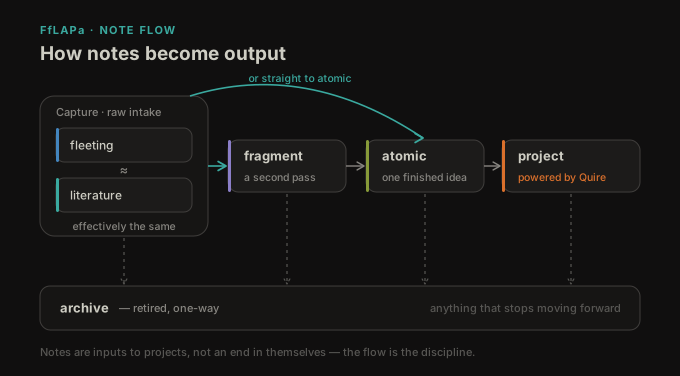
- Fleeting: Anything captured
- fragment: A fleeting note that is leaning towards, but isn’t quite, atomic
- Literature: A note from a specific source; in the same genus as fleeting
- Atomic: A finished, complete idea
- Project: Output catalyzed by and composed of atomic notes
- archive: Anything retired
Why add an f and an a to NoBoilerPlate’s FLAP system? Because it works for me. fragment notes give good-but-not-complete ideas a place. Volume outpaces available review time significantly, so having just one more slot gives me a quick win to either archive a note or retain it while still driving down the backlog.
Everything is driving towards the end. Fleeting, fragment and Literature notes all strive to be Atomic. Your review needs to be merciless. If a thought is worth developing, develop it. If it stagnates, archive it; if it’s important, it will come back. Those Atomic notes, while satisfying to see populate on a graph, are really only good if they’re going somewhere, and they all vie for a place in a Project.
Said another way: Notes run in one direction. A fleeting or literature note may sharpen into a fragment (or jump straight to atomic), then feed a project. Anything that stops moving forward gets archived.
There is no system that will do the work for you, but there are better and worse systems. A bad system is like an aesthetically-organized bookshelf. Everything looks neat and orderly, and because of it, fragile. A good system allows some play: Books might be fitted in sideways or on their spines, the groups might be loosely defined, there might even be a pencil lying on the shelf. We want a bookshelf that invites reading, not a bookshelf that instills worry.
Projects
Notes come in as Fleeting or Literature. After some review, they either get thrown in the archive or become Atomic. A Project can be anything: An essay, a story, a script, etc.
Atomic notes are infinitely composable and reusable. Projects don’t “consume” Atomic notes in the sense that the Atomic note is not usable anywhere else. Projects use — and reuse — them.
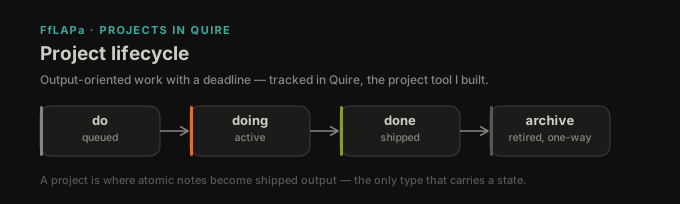
Projects use tags to communicate state: do, doing, done and archive. If you’re keeping track, that brings the total tag count to 9 because archive has already been defined.
As you’ll see in the Vault Structure section, I use a dedicated projects/ directory. I do this for a couple reasons:
- Projects tend to comprise multiple files; colocating them here is easier than linking them elsewhere
- I wrote the Quire and use it for every project; it is designed for long-form writing, which nearly all my projects are
Vault Structure
The vault is mostly flat. I reach for directories only when separation is necessary, so mostly templates, attachments, and projects.
Here’s the structure:
_archive // top-level archive, rarely used
_lib // vault-specific info & content
    _assets // default place for attachments per Obsidian settings
    _meta // a handful of vault docs
    _templates // note templates
projects // 'doing' is separate from 'thinking'
    project-name/ // specific project folder
        __overview_project-name // templated note for displaying in a base
        _quire_index // a quire plugin file
        ... // any note related to the project
... // Fleeting, fragment, Literature, archive notes
Templates
Reuse and composability are two central properties of this system. Templates adopt them as well.
I have four primary templates:
Fleeting/fragment/Atomic
title // {{title}}
date // {{date}}
tags // fleeting|fragment|atomic|
publish // boolean
Literature
Literature notes add a few properties:
title // {{title}}
date // {{date}}
tags // literature
publish // boolean
author //text
source //text
summary //text
Project
Projects, similarly, add two properties to the Fleeting/fragment/Atomic template.
Project notes also have a “state” tag: do, doing, or done.
title // {{title}}
date // {{date}}
tags // project, do|doing|done
publish // boolean
scheduled // date
due // date
Because I use Quire, I give each project a dedicated __overview_{project-name} note. This isn’t required. It’s how I organize projects and make them queryable by bases or dataview.
Workflow
Something more could be said about the plugins, the overall vault setup, and how to move through it. Suffice it to say, I don’t do anything fancy.
I have a master base with views into note types and I have workspaces saved as URIs I use as bookmarks. I add notes, templates add them with the correct tags, and then I review them somewhat regularly and either graduate them, like a fleeting note to an atomic, or archive them.
There are a few principles I use when reviewing Fleeting, Literature, and fragment notes:
- Archive Gravity: Notes are already trending towards the archive. It takes work to transform them into an Atomic. If I can’t do the work, I let them keep their natural course.
- Knots, not Nodes: An Atomic note needs a link to something else, and that link can’t be merely a category.
- If I’m linking to something like “literature”, that’s a sign of categorizing. The graph will start to look like a hub and spokes.
- But if I’m linking to something like “The most under-appreciated scene in the LotR is Saruman of Many Colours”, now that relation itself is interesting. Backlinks become useful, even inviting, and it doesn’t matter how shallow or deep the link is. It only matters that it’s there.
- Say it Succinctly: An Atomic note is in my own words, and usually if I have to say it concisely it becomes wholly mine.
A Fleeting note becomes Atomic when:
- It is my own thinking in my own words, not merely paraphrasing
- It is one developed idea
- It is related to something else
This is squishy, but the acid test is whether I would want future me to find it because it would be useful, not so that future me will handle the work.
I review Fleeting, fragment and Literature notes regularly but not strictly. I filter the master base and work down the rows until each has been developed or archived. There’s no plugin dependency or overhead. Everything needed is available right in Obsidian.
For creating Atomic notes from Fleeting, fragment and Literature notes, there is no right or wrong way. There are two methods, and I use both depending on whatever is easier:
- Rewrite and retag the note
- Create a new Atomic note and archive the other one
And when I have a project in mind:
- Create a new Quire project with an
__overview_project-namefile - Apply the template and give myself a due date
- Work on it until it needs a
doneorarchivetag
My plugins are straightforward:
- Core plugins, of course
- Advanced URI
- Git
- Linter
- OmniSearch
- Quick Switcher++
- QuickAdd
- Quire
All of the plugins are for quality of life: Finding notes and bases quickly, cleaning up notes, and actually working on a project.
I use the default theme.
Make it Your Own
I’ve tried PARA, maps of content, indexes, more classical zettelkasten, tags-as-categories, directory schemas, and many other systems, but my implementations always felt like an exhausting archival exercise. This is the one time I’ve been able to use Obsidian in a way that serves my goals, and I hope that there might be something here to get you in the right direction, too.
A simple system will be used. A minimal system is extensible. A living system will produce ideas as a matter of course.